Appearance
使用方法
安卓阿里云移动推送UTS原生插件是提供给移动开发者的移动端消息推送服务,是根据阿里云移动推送SDK开发的移动推送插件,插件集成了SDK大部分功能,插件支持uniapp和uniapp x
提示
移动推送(Mobile Push)是提供给移动开发者的移动端消息推送服务,通过在App中集成推送功能,进行高效、精准、实时的消息推送,从而使业务及时触达用户,提高用户粘性。
插件使用注意事项
- 如果您在使用插件的过程中有任何问题,可以联系作者,作者将全力协助您使用插件
- 本文档同时提供了uniapp的用法示例和uniappx的用法示例,插件市场导入的示例项目仅为uniapp的用法示例,如果您需要uniappx的示例项目可以通过下方的链接下载示例
sdk文档地址
https://help.aliyun.com/zh/document_detail/434660.html
联系作者
关注微信公众号可联系作者
插件地址
https://ext.dcloud.net.cn/plugin?id=29181
插件集成步骤
导入插件
试用插件
通过点击插件首页“试用”按钮导入插件,如图: 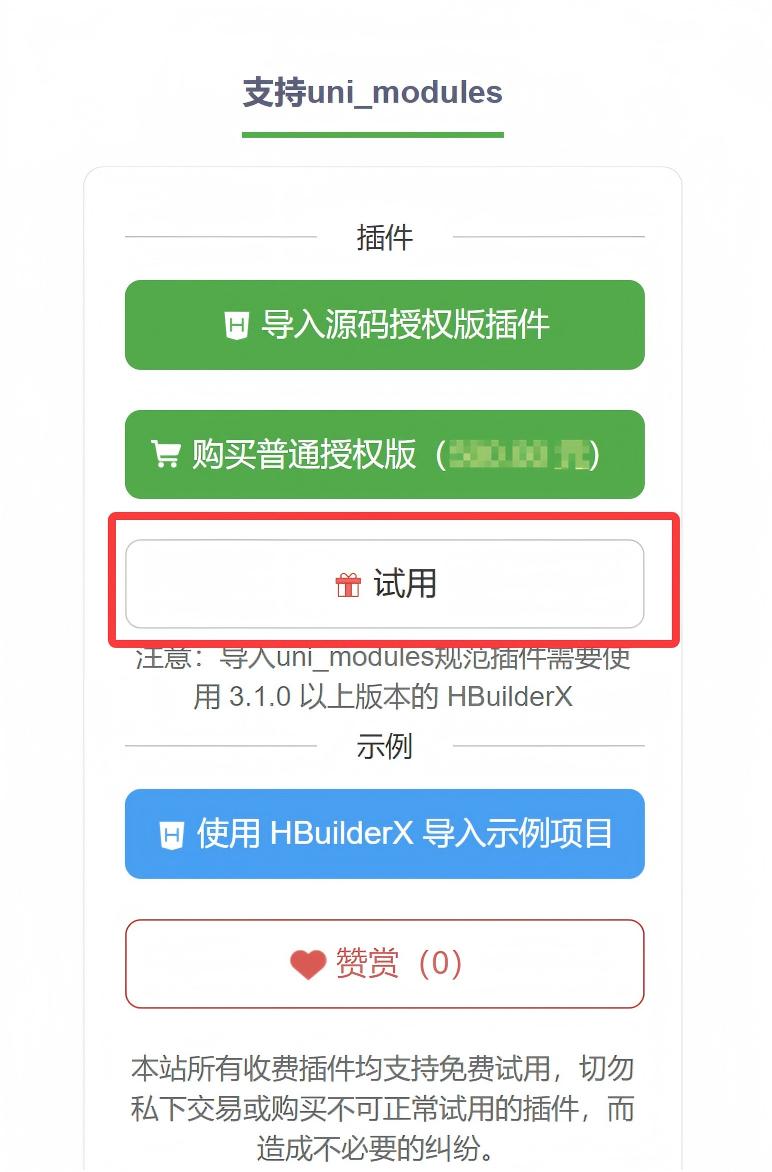
选择试用项目
点击“试用”后会弹出选择试用的项目,如图: 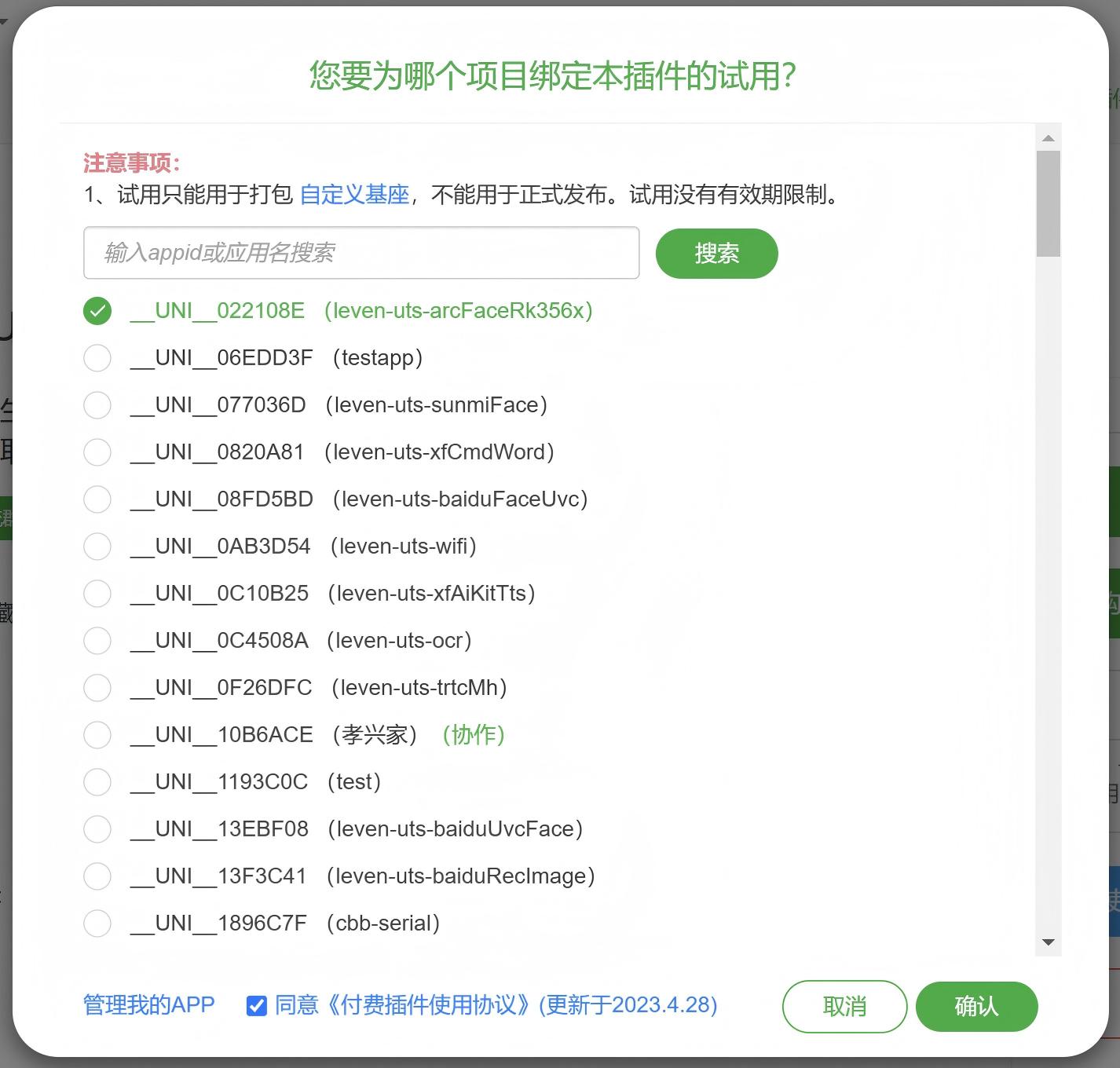
导入插件
在选择完试用项目后点击“确定”按钮,会出现如下弹窗,如图: 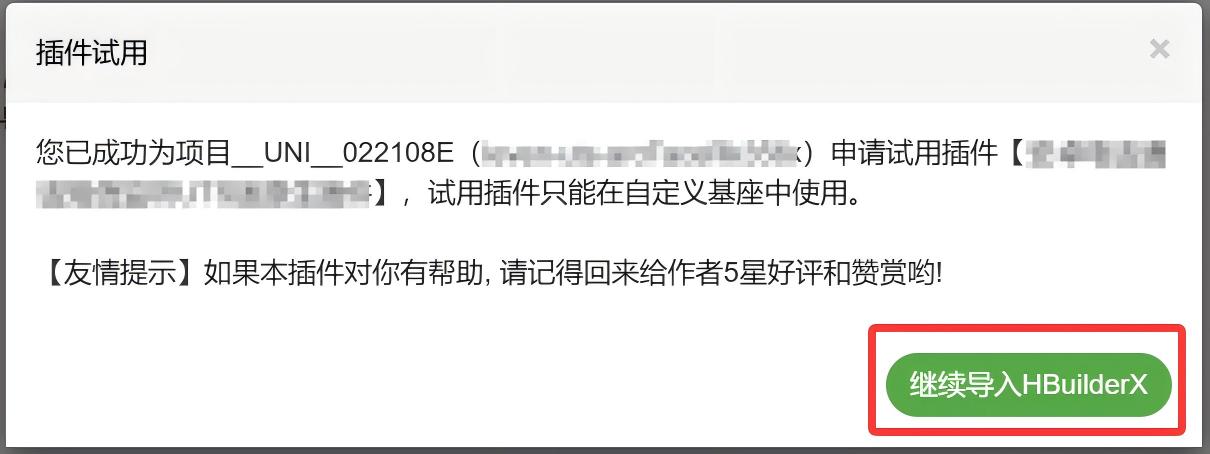 点击“继续导入HbuilderX”将插件导入到
uni_modules中,在点击按钮后会弹出HbuilderX的项目选择弹窗,如图: 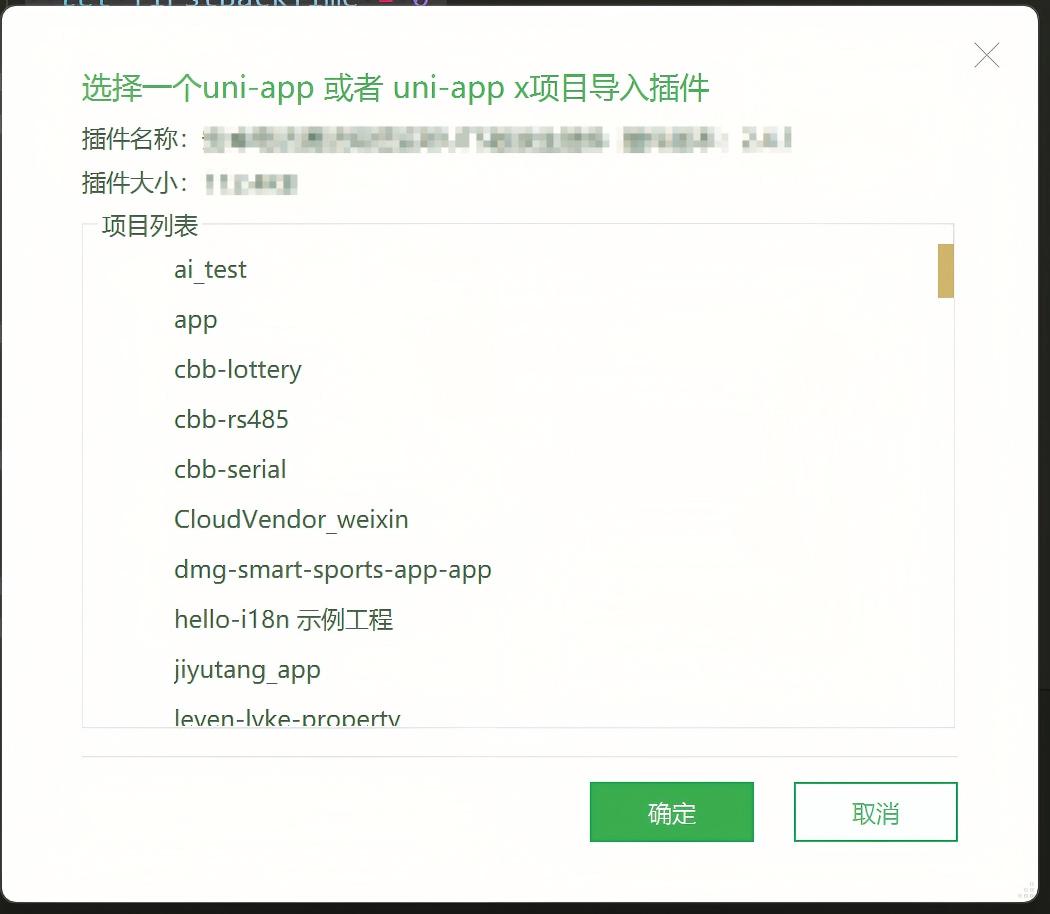 选择项目后点击“确定”按钮,插件就导入到项目中了
验证插件是否导入项目
打开项目,找到项目的uni_modules目录,如果有以插件ID命名的目录就说明导入插件成功了,如图所示: 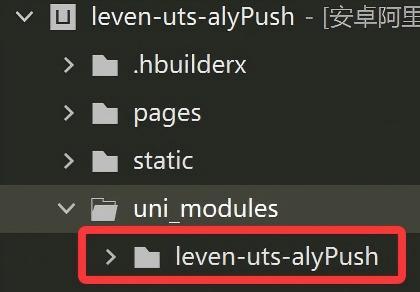
使用插件
插件引入
在需要使用插件的页面加载以下代码
js
import * as module from "@/uni_modules/leven-uts-alyPush"js
import * as module from "@/uni_modules/leven-uts-alyPush"初始化流程
初始化流程需要在项目的App.vue或App.uvue文件的onLaunch的生命周期内处理,其他生命周期处理可能不生效。下面的流程为整个初始化流程可供参考
1.判断通知权限是否开启
可以通过插件提供的方法areNotificationsEnabled来判断通知权限是否开启,如果没有开启可以通过openNotificationSettings方法跳转到通知权限开启的页面
js
//判断通知权限是否开启
areNotificationsEnabled() {
  module.areNotificationsEnabled({
    complete: (res) => {
      if (res.code == 0) {
        let data = res.data;
        if (data.result) {
          //已经开启通知权限
          console.log("已经开启通知权限");
          this.pushConfig();
        } else {
          //打开通知权限页面
          this.openNotificationSettings()
        }
      } else {
        this.showMessage(res.message)
      }
    }
  })
},
//打开通知权限页面
openNotificationSettings() {
  module.openNotificationSettings({
    complete: (res) => {
      if (res.code == 0) {
        let data = res.data;
        if (!data.result) {
          this.showMessage("未开启通知权限")
        }
        this.pushConfig();
      } else {
        this.showMessage(res.message)
      }
    }
  })
},js
//判断通知权限是否开启
areNotificationsEnabled() {
  module.areNotificationsEnabled({
    complete: (res : LevenResult) => {
      if (res.code == 0) {
        let data = res.data;
        let result : boolean = data.getBoolean("result")!
        if (result) {
          //已经开启通知权限
          console.log("已经开启通知权限");
          this.pushConfig();
        } else {
          //打开通知权限页面
          this.openNotificationSettings()
        }
      } else {
        this.showMessage(res.message)
      }
    }
  } as LevenOptions)
},
//打开通知权限页面
openNotificationSettings() {
  module.openNotificationSettings({
    complete: (res : LevenResult) => {
      if (res.code == 0) {
        let data = res.data;
        let result : boolean = data.getBoolean("result")!
        if (!result) {
          this.showMessage("未开启通知权限")
        }
        this.pushConfig();
      } else {
        this.showMessage(res.message)
      }
    }
  } as LevenOptions)
},2.推送配置
通知权限开启后可以通过pushConfig方法配置AppKey和AppSecret,在配置之前需要登录EMAS控制台,登录账号为您的百川平台账号,并使用阿里EMAS平台的AppKey和AppSecret
js
//推送配置
pushConfig() {
  module.pushConfig({
    params: {
      appKey: "335739803",
      appSecret: "b11cd14e12fa4585927c839aba76c82f"
    },
    complete: (res) => {
      if (res.code == 0) {
        //建立长链接
        this.register();
      } else {
        this.showMessage(res.message)
      }
    }
  })
},js
//推送配置
pushConfig() {
  module.pushConfig({
    params: {
      appKey: "335739803",
      appSecret: "b11cd14e12fa4585927c839aba76c82f"
    },
    complete: (res : LevenResult) => {
      if (res.code == 0) {
        //建立长链接
        this.register();
      } else {
        this.showMessage(res.message)
      }
    }
  } as LevenOptions)
},3.注册长链接
此阶段初始化用于建立推送的长连接,可以根据业务需要和合规要求延迟执行。
js
register() {
  module.register({
    complete: (res) => {
      if (res.code == 0) {
        let data = res.data;
        let type = data.type;
        if (type == "onSuccess") {
          console.log("长链接创建完成")
        } else {
          console.log("长链接创建失败:" + JSON.stringify(data))
        }
      } else {
        this.showMessage(res.message)
      }
      //创建通道通知
      this.createNotificationChannel();
    }
  })
}js
register() {
  module.register({
    complete: (res : LevenResult) => {
      if (res.code == 0) {
        let data = res.data;
        let type = data.getString("type")!;
        if (type == "onSuccess") {
          console.log("长链接创建完成")
        } else {
          console.log("长链接创建失败:" + JSON.stringify(data))
        }
      } else {
        this.showMessage(res.message)
      }
      //创建通道通知
      this.createNotificationChannel();
    }
  } as LevenOptions)
}4.创建通道通知
安卓8.0以上的应用需要在客户端主动创建NotificaitonChannel,在uniapp和uniappx中可以直接调用该接口,插件内部已自动处理是否是安卓8.0以上
js
createNotificationChannel() {
  module.createNotificationChannel({
    params: {
      channelId: "vibration_sound",
      name: "我的测试通道",
      description: "我的测试通道",
      enableLights: true,
      lightColor: "#FF0000",
      enableVibration: true,
      vibrationPattern: [100, 200, 300, 400, 500, 400, 300, 200, 400]
    },
    complete: (res) => {
      if (res.code == 0) {
        //创建厂商通道
        this.registerThirdPush();
      } else {
        this.showMessage(res.message)
      }
    }
  })
}js
createNotificationChannel() {
  module.createNotificationChannel({
    params: {
      channelId: "vibration_sound",
      name: "我的测试通道",
      description: "我的测试通道",
      enableLights: true,
      lightColor: "#FF0000",
      enableVibration: true,
      vibrationPattern: [100, 200, 300, 400, 500, 400, 300, 200, 400]
    },
    complete: (res : LevenResult) => {
      if (res.code == 0) {
        //创建厂商通道
        this.registerThirdPush();
      } else {
        this.showMessage(res.message)
      }
    }
  } as LevenOptions)
}5.厂商通道注册
为了提高App离线状态下的推送到达率,建议集成厂商通道
js
registerThirdPush() {
  module.registerThirdPush({
    params: {},
    complete: (res) => {
      console.log("厂商通道注册完毕:" + JSON.stringify(res))
      //接收推送消息
      this.setPushIntentReceiver();
      //获取终端id
      this.getDeviceId();
    }
  })
}js
registerThirdPush() {
  module.registerThirdPush({
    params: {},
    complete: (res : LevenResult) => {
      console.log("厂商通道注册完毕:" + JSON.stringify(res))
      //接收推送消息
      this.setPushIntentReceiver();
      //获取终端id
      this.getDeviceId();
    }
  } as LevenOptions)
}6.接收推送消息
到这一步说明您已经完成了SDK的初始化,推送长连接已经成功建立,但是要接收推送消息,还需要进行一些配置
js
setPushIntentReceiver() {
  module.setPushIntentReceiver({
    params: {},
    complete: (res) => {
      console.log(res)
    }
  })
}js
setPushIntentReceiver() {
  module.setPushIntentReceiver({
    params: {},
    complete: (res : LevenResult) => {
      console.log(res)
    }
  } as LevenOptions)
}说明
完成以上6步的集成说明已经成功初始化sdk了,此时应该可以接收到消息推送了,接收消息推送目前仅支持MessageReceiver暂不支持AliyunMessageIntentService
页面内容
vue
<script>
  import * as module from "uni_modules/leven-uts-alyPush"
  export default {
    onLaunch: function() {
      console.log('App Launch')

      //配置应用
      this.configApp();
    },
    onShow: function() {
      console.log('App Show')
    },
    onHide: function() {
      console.log('App Hide')
    },
    methods: {
      //展示信息
      showMessage(message) {
        uni.showToast({
          title: message,
          icon: "none"
        })
      },
      //配置应用
      configApp() {
        //判断通知权限是否开启
        this.areNotificationsEnabled();
      },
      //判断通知权限是否开启
      areNotificationsEnabled() {
        module.areNotificationsEnabled({
          complete: (res) => {
            if (res.code == 0) {
              let data = res.data;
              if (data.result) {
                //已经开启通知权限
                console.log("已经开启通知权限");
                this.pushConfig();
              } else {
                //打开通知权限页面
                this.openNotificationSettings()
              }
            } else {
              this.showMessage(res.message)
            }
          }
        })
      },
      //打开通知权限页面
      openNotificationSettings() {
        module.openNotificationSettings({
          complete: (res) => {
            if (res.code == 0) {
              let data = res.data;
              if (!data.result) {
                this.showMessage("未开启通知权限")
              }
              this.pushConfig();
            } else {
              this.showMessage(res.message)
            }
          }
        })
      },
      //推送配置
      pushConfig() {
        module.pushConfig({
          params: {
            appKey: "335738507",
            appSecret: "9e6b925f5368461e9c3d070a1c44890c"
          },
          complete: (res) => {
            if (res.code == 0) {
              //建立长链接
              this.register();
            } else {
              this.showMessage(res.message)
            }
          }
        })
      },
      register() {
        module.register({
          complete: (res) => {
            if (res.code == 0) {
              let data = res.data;
              let type = data.type;
              if (type == "onSuccess") {
                console.log("长链接创建完成")
              } else {
                console.log("长链接创建失败:" + JSON.stringify(data))
              }
            } else {
              this.showMessage(res.message)
            }
            //创建通道通知
            this.createNotificationChannel();
          }
        })
      },
      createNotificationChannel() {
        module.createNotificationChannel({
          params: {
            channelId: "vibration_sound",
            name: "我的测试通道",
            description: "我的测试通道",
            enableLights: true,
            lightColor: "#FF0000",
            enableVibration: true,
            vibrationPattern: [100, 200, 300, 400, 500, 400, 300, 200, 400]
          },
          complete: (res) => {
            if (res.code == 0) {
              //创建厂商通道
              this.registerThirdPush();
            } else {
              this.showMessage(res.message)
            }
          }
        })
      },
      registerThirdPush() {
        module.registerThirdPush({
          params: {},
          complete: (res) => {
            console.log("厂商通道注册完毕:" + JSON.stringify(res))
            //接收推送消息
            this.setPushIntentReceiver();
            //获取终端id
            this.getDeviceId();
          }
        })
      },
      setPushIntentReceiver() {
        module.setPushIntentReceiver({
          params: {},
          complete: (res) => {
            console.log(res)
          }
        })
      },
      getDeviceId() {
        module.getDeviceId({
          complete: (res) => {
            console.log(res)
          }
        })
      }
    }
  }
</script>

<style>
  /*每个页面公共css */
</style>vue
<script lang="uts">
  import * as module from "uni_modules/leven-uts-alyPush"
  import { LevenResult, LevenOptions } from "@/uni_modules/leven-uts-alyPush"
  // #ifdef APP-ANDROID || APP-HARMONY
  let firstBackTime = 0
  // #endif
  export default {
    onLaunch: function () {
      console.log('App Launch')
      //配置应用
      this.configApp();
    },
    onShow: function () {
      console.log('App Show')
    },
    onHide: function () {
      console.log('App Hide')
    },
    // #ifdef APP-ANDROID || APP-HARMONY
    onLastPageBackPress: function () {
      console.log('App LastPageBackPress')
      if (firstBackTime == 0) {
        uni.showToast({
          title: '再按一次退出应用',
          position: 'bottom',
        })
        firstBackTime = Date.now()
        setTimeout(() => {
          firstBackTime = 0
        }, 2000)
      } else if (Date.now() - firstBackTime < 2000) {
        firstBackTime = Date.now()
        uni.exit()
      }
    },
    // #endif
    onExit: function () {
      console.log('App Exit')
    },
    methods: {
      //展示信息
      showMessage(message : string) {
        uni.showToast({
          title: message,
          icon: "none"
        })
      },
      //配置应用
      configApp() {
        //判断通知权限是否开启
        this.areNotificationsEnabled();
      },
      //判断通知权限是否开启
      areNotificationsEnabled() {
        module.areNotificationsEnabled({
          complete: (res : LevenResult) => {
            if (res.code == 0) {
              let data = res.data;
              let result : boolean = data.getBoolean("result")!
              if (result) {
                //已经开启通知权限
                console.log("已经开启通知权限");
                this.pushConfig();
              } else {
                //打开通知权限页面
                this.openNotificationSettings()
              }
            } else {
              this.showMessage(res.message)
            }
          }
        } as LevenOptions)
      },
      //打开通知权限页面
      openNotificationSettings() {
        module.openNotificationSettings({
          complete: (res : LevenResult) => {
            if (res.code == 0) {
              let data = res.data;
              let result : boolean = data.getBoolean("result")!
              if (!result) {
                this.showMessage("未开启通知权限")
              }
              this.pushConfig();
            } else {
              this.showMessage(res.message)
            }
          }
        } as LevenOptions)
      },
      //推送配置
      pushConfig() {
        module.pushConfig({
          params: {
            appKey: "335739803",
            appSecret: "b11cd14e12fa4585927c839aba76c82f"
          },
          complete: (res : LevenResult) => {
            if (res.code == 0) {
              //建立长链接
              this.register();
            } else {
              this.showMessage(res.message)
            }
          }
        } as LevenOptions)
      },
      register() {
        module.register({
          complete: (res : LevenResult) => {
            if (res.code == 0) {
              let data = res.data;
              let type = data.getString("type")!;
              if (type == "onSuccess") {
                console.log("长链接创建完成")
              } else {
                console.log("长链接创建失败:" + JSON.stringify(data))
              }
            } else {
              this.showMessage(res.message)
            }
            //创建通道通知
            this.createNotificationChannel();
          }
        } as LevenOptions)
      },
      createNotificationChannel() {
        module.createNotificationChannel({
          params: {
            channelId: "vibration_sound",
            name: "我的测试通道",
            description: "我的测试通道",
            enableLights: true,
            lightColor: "#FF0000",
            enableVibration: true,
            vibrationPattern: [100, 200, 300, 400, 500, 400, 300, 200, 400]
          },
          complete: (res : LevenResult) => {
            if (res.code == 0) {
              //创建厂商通道
              this.registerThirdPush();
            } else {
              this.showMessage(res.message)
            }
          }
        } as LevenOptions)
      },
      registerThirdPush() {
        module.registerThirdPush({
          params: {},
          complete: (res : LevenResult) => {
            console.log("厂商通道注册完毕:" + JSON.stringify(res))
            //接收推送消息
            this.setPushIntentReceiver();
            //获取终端id
            this.getDeviceId();
          }
        } as LevenOptions)
      },
      setPushIntentReceiver() {
        module.setPushIntentReceiver({
          params: {},
          complete: (res : LevenResult) => {
            console.log(res)
          }
        } as LevenOptions)
      },
      getDeviceId() {
        module.getDeviceId({
          complete: (res : LevenResult) => {
            console.log(res)
          }
        } as LevenOptions)
      }
    }
  }
</script>

<style>
  /*每个页面公共css */
  @import "@/uni_modules/rice-ui/libs/style/index.css";
</style>